Use these flows to design the screens around TalusPay's hosted onboarding. Your app owns the entry point and status screen; TalusPay hosts the application, signing and requests for additional KYC information.
The messages and button labels below are suggested UI copy. Status values and actions come from the API reference and KYC guide.
Sign the merchant in to your app before opening their onboarding URL. Create the merchant and link on your server, using account credentials. Keep the returned URL private: it signs the merchant in to hosted onboarding.
After returning: fetch the merchant on your server and show its current status. The redirect alone doesn't prove that signing, KYC or payment setup finished. Implement this flow.
Offer Continue application for IN_PROGRESS, or Sign application for READY_TO_SIGN. Keep the same merchant ID when resuming so the merchant picks up where they left off.
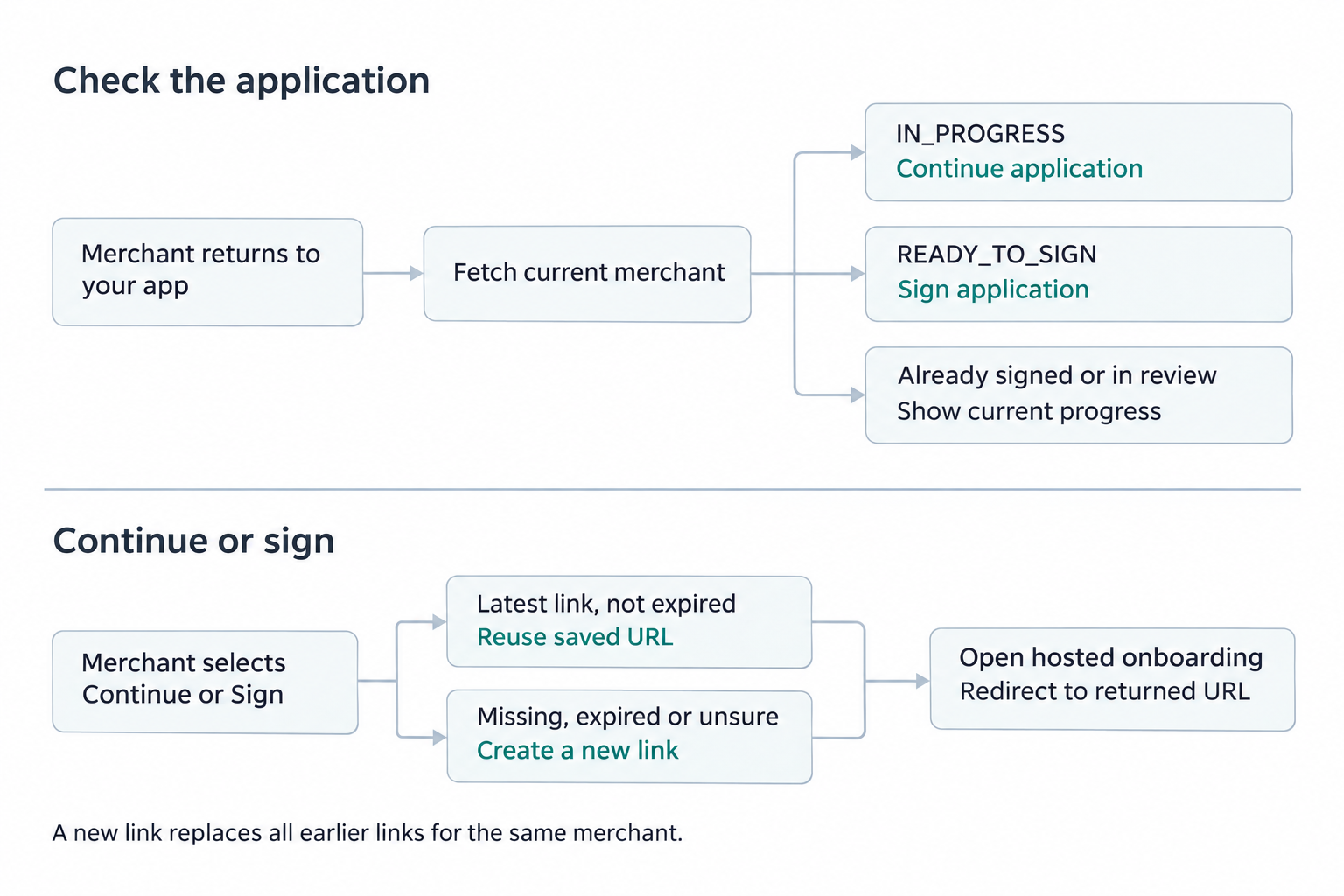
Check the application: use GET /v1/merchants/{merchant_id} and its lead_onboarding_status. IN_PROGRESS and READY_TO_SIGN allow the merchant to continue; once the main owner signs (COMPLETED), show signing or review progress instead. See the status guide for other states.
Choose the link: reuse a saved URL only when your server knows it is the latest link and its expires_at is in the future. If it is missing, expired or possibly replaced, call POST /v1/onboarding_links with the same merchant_id and use the returned url. Creating a new link invalidates all older links for that merchant.
Handle failures: if the status read or link request fails, stay on the status screen and offer Try again. Prevent repeated clicks while requesting a link. If a link is rejected, refresh the merchant's status before offering another one.
Show a readable status, a short explanation, and a button only when the merchant has something to do. Keep application review and payment setup separate: an approved application is not proof that payments are ready.
| API state | Suggested heading and message | Action |
|---|---|---|
lead_onboarding_status is IN_PROGRESS | Your application is in progress. Complete your business and owner details, or continue where you left off. | Continue application → hosted onboarding |
READY_TO_SIGN | Your application is ready to sign. Review it and sign the merchant agreement. | Sign application → hosted onboarding |
COMPLETED | Your application is signed. Any remaining owners must sign before review can begin. Once all signatures are collected, review starts automatically. | No application editing action; refresh status when the merchant returns |
KYC_IN_PROGRESS | Your application is being reviewed. We're verifying your business and its owners. | No action; refresh status when the merchant returns |
APPROVED | Your application is approved. Check payment setup below. | Use the payment setup state |
APPROVED_ON_HOLD or PENDED | Check your application review. Read the expanded approval status to show whether action or waiting is needed. | Use the review details below |
FAILED | Onboarding could not be completed. Show the available review outcome or support contact. | Contact support using your configured support destination |
Every merchant starts at IN_PROGRESS, even before any application data is sent, so use Start application for a merchant you have just created and Continue application after that. Clearing a required field moves a READY_TO_SIGN merchant back to IN_PROGRESS. Treat a status you don't know as one you don't act on: new statuses may be added.
For a submitted application, request GET /v1/merchants/{merchant_id}?expand=approval_status when review details are needed. The expansion calls the KYC provider live; avoid continuous polling.
Expanded approval_status | Suggested heading and message | Action |
|---|---|---|
APPROVED_WITH_REVIEW | More information needed. Your application is approved, but the review team needs additional information. | Provide information → status_review_url |
PENDED_ACTION_REQUIRED | More information needed. Send the requested information so review can continue. | Provide information → status_review_url |
APPROVED_UNDER_REVIEW or PENDED_UNDER_REVIEW | Your information is being reviewed. No additional information is requested right now. | Optional View review status → status_review_url |
APPROVED | Your application is approved. Check payment setup below. | Use the payment setup state |
DECLINED | Your application was declined. Contact support if you need help understanding the outcome. | Contact support; don't offer another application as a retry |
| Missing value | Review details are not available yet. Check again later. | Refresh status; keep the known application status visible |
Only show a review button when status_review_url is present. A missing expansion can mean KYC has not decided or could not be reached; it is not a decline. A failed status request should say We couldn't refresh your status and offer Try again, rather than replacing the merchant's status with a failure outcome.
payment_onboarding_status | Suggested heading and message | Action |
|---|---|---|
NOT_STARTED | Payments are not set up yet. Application approval and payment setup are separate steps. | Continue showing application progress; don't offer a payment action |
ONBOARDED | Payment setup is complete. Your account has been set up for payments. | Show setup completion; this guide doesn't provide a payment action |
FAILED | Payment setup needs attention. We couldn't finish setting up payments. | Contact support; don't ask the merchant to repeat their application |
For a new integration, use merchant.payments_onboarded to learn when setup completes. If the event is missed, read the current merchant's payment_onboarding_status. The public API and merchant webhooks do not return payment gateway credentials. Endpoints for taking payments are not published yet.
If deactivated is true, show Account deactivated with a support destination instead of a ready-to-use payment action, even when earlier onboarding statuses were successful. Don't use these UI suggestions to override a current KYC restriction. See How KYC works for review conditions.
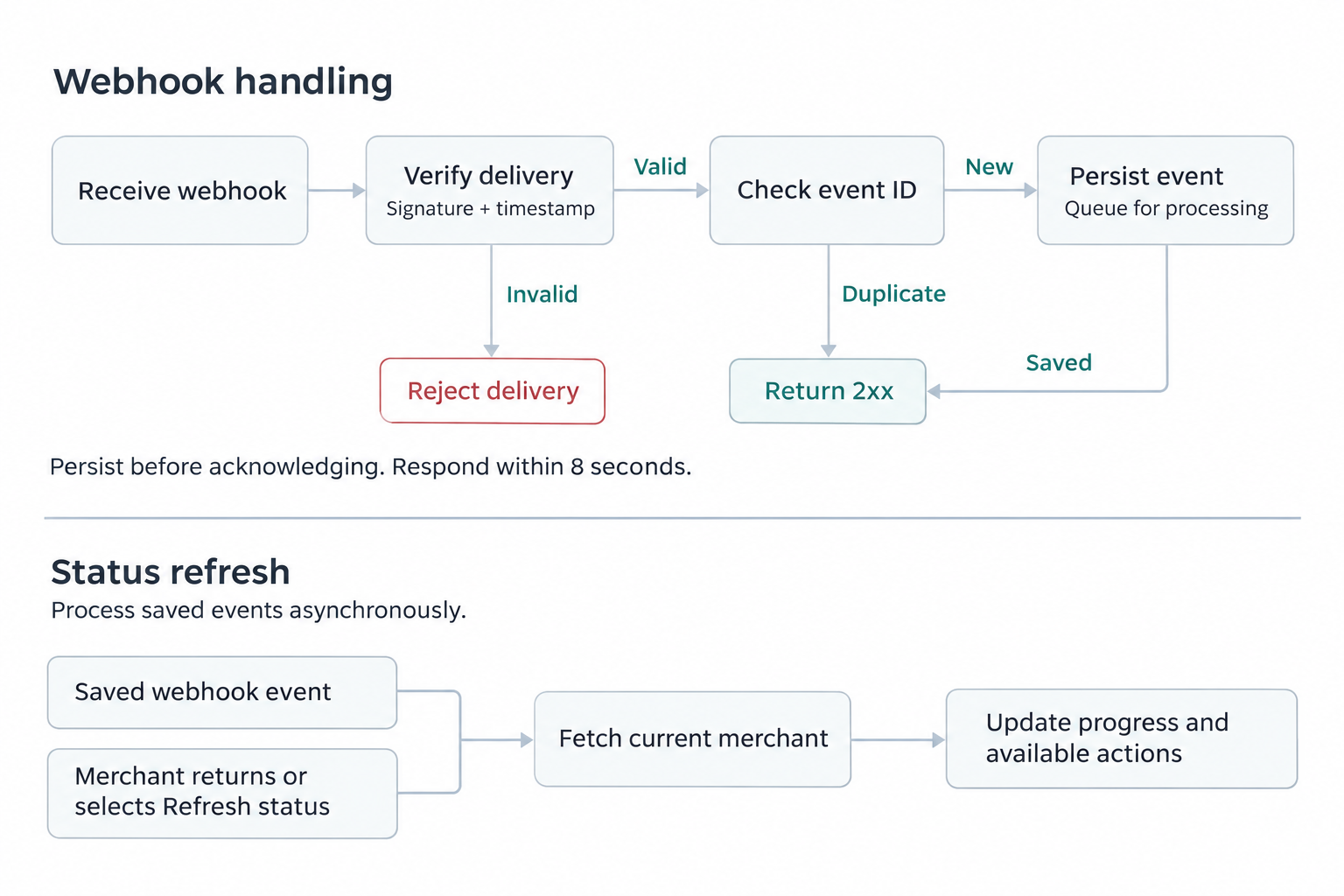
Persist work before acknowledging it, and finish the response within 8 seconds. Failed deliveries aren't retried automatically. Refresh from the API when a merchant returns, when an event leaves the state unclear, or when a status request is retried. Don't assume a missing webhook means onboarding failed. See Webhook delivery.
Test a new application, a return before all signatures are collected, an expired or replaced link, a request for more information, a declined application, payment setup failure, a missed webhook and a failed status refresh. Use sandbox test events for the supported simulations; the testing guide lists which cases need a real hosted flow or fixtures.
Next: implement hosted onboarding, read KYC statuses, or test the integration.